

What Is an Adjustable T Square and Why Contractors Use It
An adjustable T square is a layout tool with a sliding or pivoting head that lets you mark straight lines, set angles, and score sheet materials — all with one tool. Here’s a quick overview:
| Feature | Adjustable T Square | Standard T Square |
|---|---|---|
| Head position | Slides or pivots | Fixed |
| Angle settings | 0°–90° (varies by model) | 90° only |
| Best for | Angles, layouts, drywall | Basic straight lines |
| Common sizes | 12″, 24″, 48″ | 24″, 48″ |
| Typical materials | Anodized aluminum, steel | Aluminum, plastic |
If you work with drywall, framing, or sheet goods, an adjustable T square saves you from switching between multiple layout tools. You can lock it at 90° for standard cuts, then quickly pivot to 45° or another angle for vaulted ceilings, stair layouts, or angled cuts — without losing your place on the board.
Over 2,000 adjustable T square models are available on the market today, ranging from compact 12-inch woodworking versions to heavy-duty 48-inch drywall squares built for jobsite use.
This guide is authored by Western Wholesale Supply, a third-generation building materials supplier that has supported contractors across the region with drywall tools and layout equipment for years — including the adjustable T squares we’ll break down in this guide. Our hands-on distribution experience gives us a practical view of which features actually matter on the job.
Similar topics to adjustable t square:
Understanding the Tool and Its Variations
The big advantage of an adjustable T square is simple: it gives you a straightedge, square, angle guide, and repeat-layout reference in one tool.
A standard T square is excellent when all you need is a clean 90-degree line across drywall or panel stock. But real jobsite layouts are not always that polite. Walls are out of square. Ceilings slope. Stairs need angled cuts. Cabinet parts need repeatable reference marks. That is where the adjustable head earns its keep.
The adjustable head may:
- Pivot to different angles
- Slide along the blade
- Lock at common angles
- Fold for storage
- Act as a board-edge reference
- Help mark repeat offsets or parallel lines
In drywall work, the most common version is the 48-inch adjustable drywall T square. In woodworking and cabinetry, shorter precision models are common because they are easier to use on bench work, plywood parts, drawer components, and cabinet panels.
What is an Adjustable T Square?
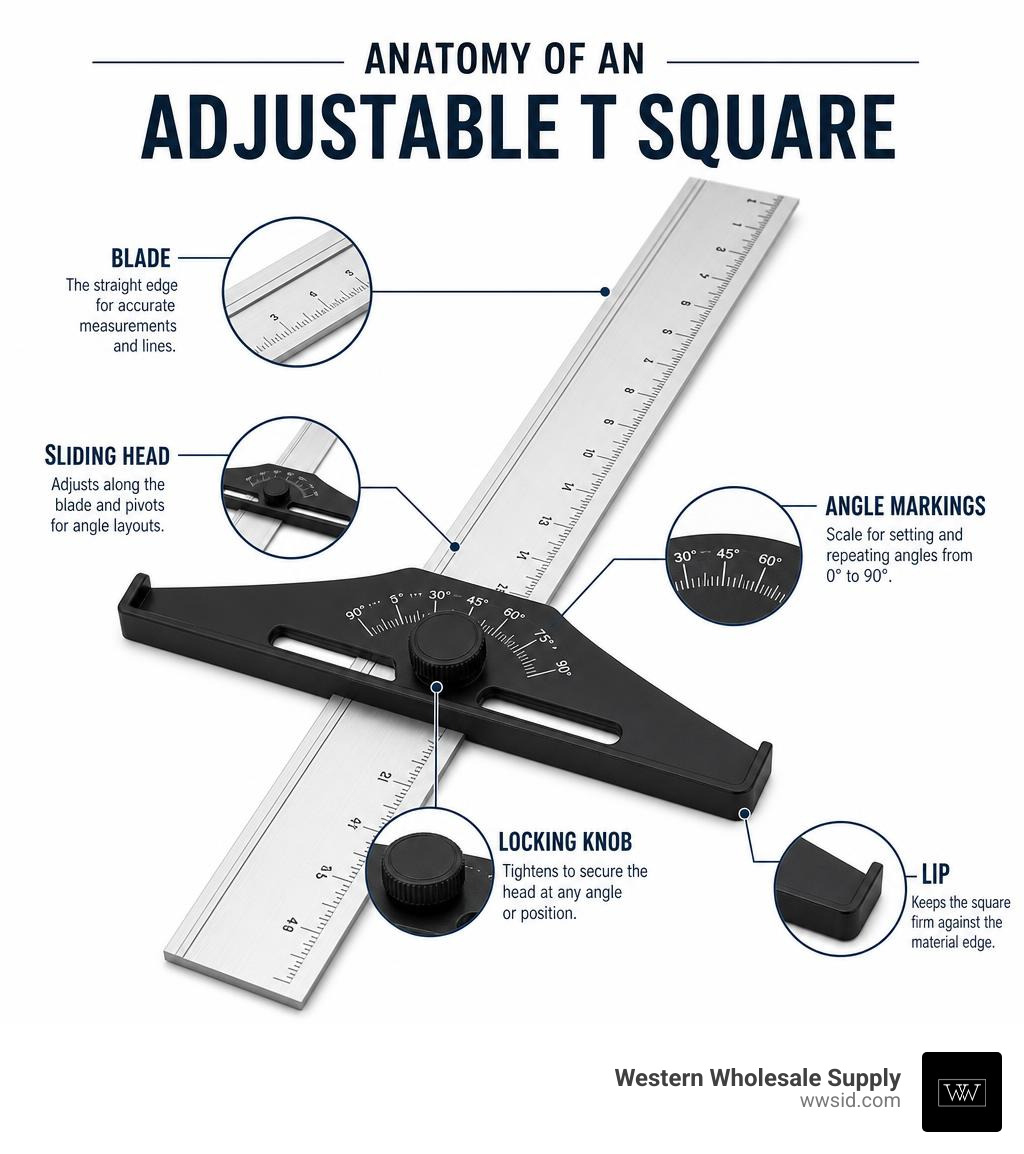
An adjustable T square is a measuring and marking tool with a long blade and a movable head. The blade is the long straightedge. The head is the crosspiece that registers against the edge of your sheet, board, or panel.
On a standard T square, the head is fixed at 90 degrees. On an adjustable model, the head can move. Depending on the design, it may slide, pivot, index into preset angles, or fold flat for transport.
The basic parts include:
- Blade: The long measuring edge used for marking, scoring, or guiding a knife.
- Head: The crosspiece that rests against the material edge.
- Locking knob or lever: Tightens the head at the selected angle.
- Angle scale: Shows degree settings such as 30, 45, 60, 75, or 90 degrees.
- Measurement graduations: Inch or metric markings along the blade.
- Lip or ledge: Helps the tool sit securely on drywall or sheet goods.
- Scribing holes or notches: Allow repeat parallel marks with a pencil.
The difference sounds small until you are standing on a jobsite trying to mark a sloped ceiling cut while balancing a full sheet of board. Then the adjustable head starts looking like the smartest person in the room.
Common Sizes and Types for Construction and Woodworking
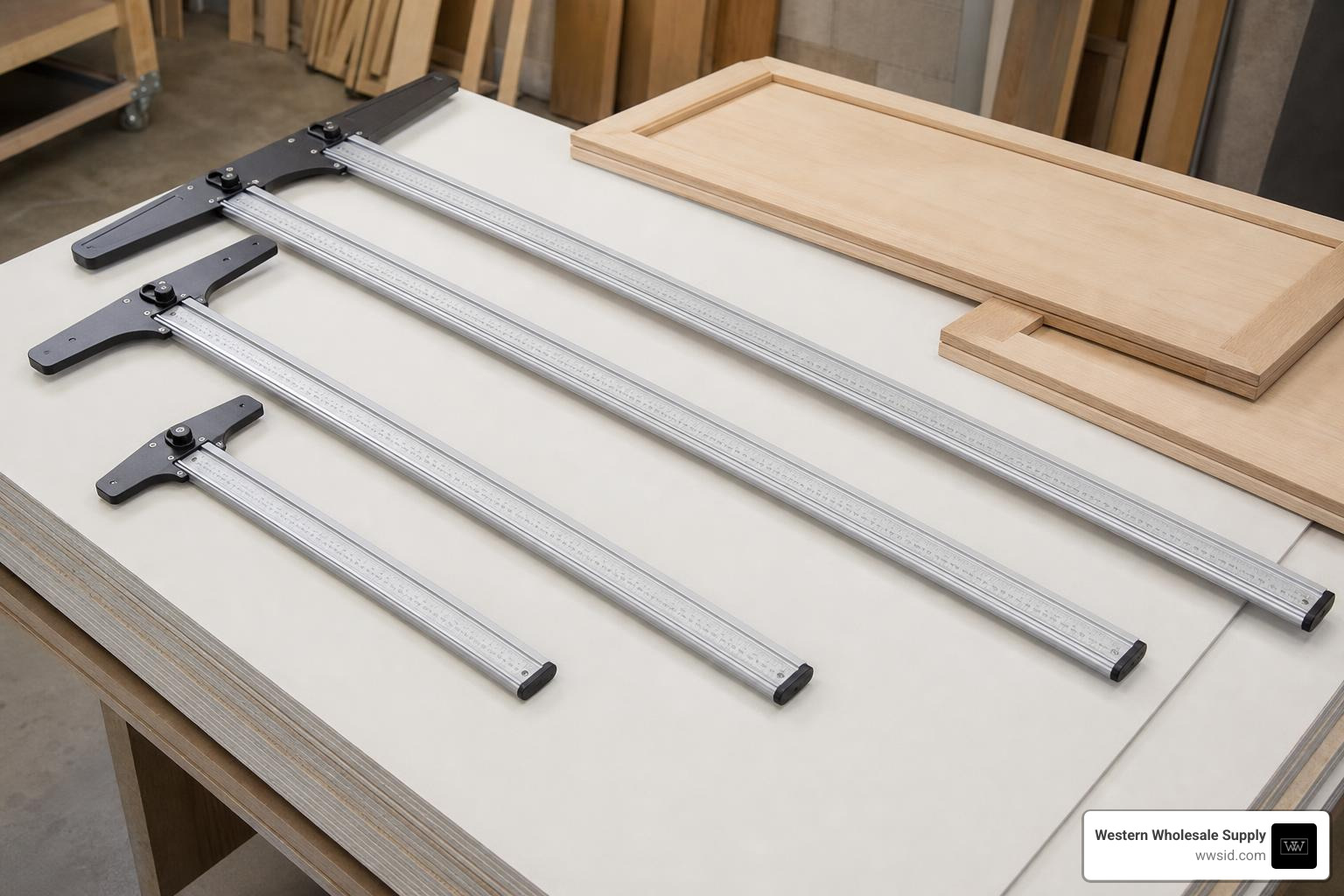
Adjustable T squares come in several common sizes. The right one depends on the material you work with most often.
| Size | Best Use | Notes |
|---|---|---|
| 12-inch | Cabinet parts, trim layouts, small panels | Compact and easy to use on a bench |
| 24-inch | Woodworking, smaller sheet layouts, shop use | Good balance of reach and control |
| 32-inch | Larger cabinet panels and sheet goods | Useful where 24 inches feels short |
| 48-inch | Drywall, sheathing, full sheet layout | Most common for construction and wallboard |
A 48-inch blade is the go-to size for drywall because it spans the width of a standard 4-foot sheet. That means you can hook the head on the board edge, mark a full-width line, and score with fewer steps.
A 24-inch blade is useful for smaller panels, cabinetry, shelf parts, soffits, and repair work. Shorter 12-inch versions are common in precision woodworking because they are lighter, easier to maneuver, and less awkward around clamps, saw fences, and bench stops.
Common types include:
- Adjustable drywall T squares: Usually 48 inches, made for full sheets, scoring, and angled cuts.
- Precision woodworking T squares: Often 12 to 32 inches, built for tight layout tolerances and scribing.
- Folding adjustable T squares: Designed for easier storage and transport.
- Sliding-head T squares: Allow the head to move along the blade for offsets and repeat marks.
- Positive-indexing T squares: Lock into preset angles for repeatable accuracy.
- Table saw fence T-square systems: Used for fence alignment and repeatable ripping setups.
For drywall crews in Eastern Idaho and Western Wyoming, the practical choice is usually a durable 48-inch adjustable model. For finish carpenters and cabinet shops, a shorter precision model may be the better daily driver.
Material Selection and Build Quality
The material of an adjustable T square affects weight, stiffness, corrosion resistance, accuracy, and how long the markings stay readable.
Most jobsite adjustable T squares are made from aluminum because it is light, stiff enough for broad sheet layout, and resistant to rust. Better aluminum models often use anodized finishes, which protect the surface and help reduce oxidation. Some models also use thermal-bonded or deeply etched markings so the numbers do not disappear after a few weeks of riding around in a truck.
The Johnson Level ADS48 Adjust-A-Square is a good example of the construction-style category: a 48-inch adjustable aluminum square with common angle references and graduations designed for drywall, plywood, OSB, and similar sheet materials.
Precision woodworking models may use steel blades, stainless steel, or specialty hardened steel. These can provide excellent rigidity and fine markings, but they may be heavier than aluminum and sometimes better suited to shop work than rough jobsite use.
Impact of Materials on Jobsite Performance
Here is how material choice affects real-world performance:
| Material or Feature | Why It Matters |
|---|---|
| Anodized aluminum | Resists rust and corrosion, stays lighter for daily use |
| Heat-treated aluminum | Improves durability and helps the blade resist bending |
| Steel or hardened steel | Excellent stiffness and precision, often heavier |
| Thick blade and head | Reduces flex and helps maintain square accuracy |
| Laser-etched markings | Easier to keep readable over time |
| Thermal-bonded graduations | Better durability than lightly printed markings |
| Satin or low-glare finish | Reduces glare and helps prevent reading errors |
A thin, flimsy blade can deflect when you press a pencil or knife against it. That deflection may not look like much, but across a 48-inch board it can throw off the cut. On a drywall sheet, a small layout error can become a gap. On cabinetry, it can become a door or face frame that does not line up.
Look for a blade that feels rigid, a head that does not wobble, and markings that are easy to read in normal jobsite lighting. If you have to squint every time you measure, the tool is already slowing you down.
Key Features to Look For in an Adjustable T Square
A good adjustable T square does not need to be fancy. It needs to be accurate, repeatable, readable, and durable.
The most important features are:
- A head that locks firmly
- Clear angle markings
- A straight, rigid blade
- Easy-to-read measurement graduations
- A smooth sliding or pivoting action
- A strong edge lip for sheet materials
- Scribing notches or holes if you do repeat offsets
- A size that matches your material
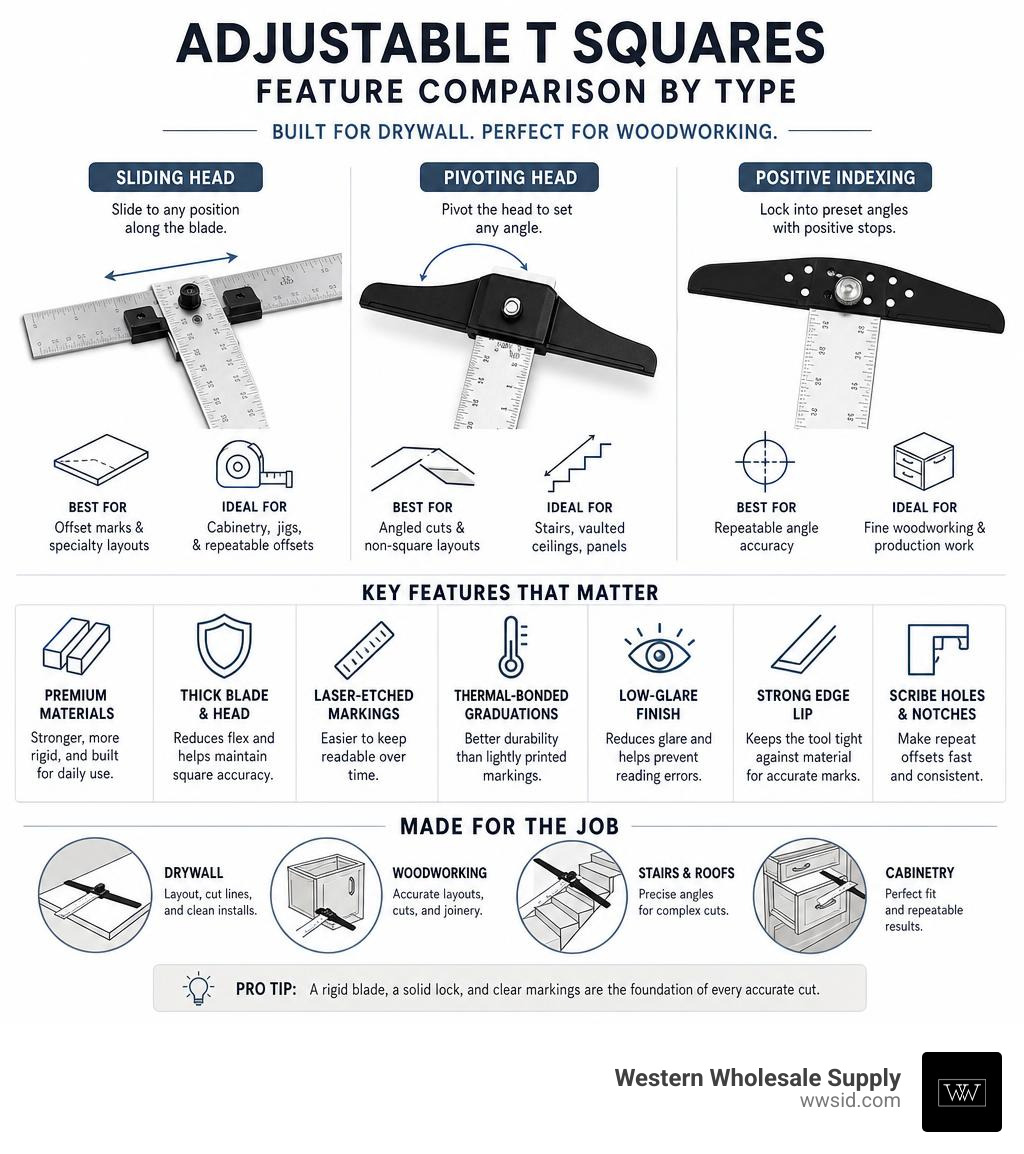
Some precision models, such as the Woodpeckers Posi-Lock T-Square, use positive indexing to lock into angle positions. That type of system is especially useful when repeatability matters, such as woodworking layouts or repeated angled marks.
| Feature | Why It Helps | Best For |
|---|---|---|
| Sliding head | Adjusts position along blade | Offset marks and specialty layouts |
| Pivoting head | Sets angled cuts | Vaulted ceilings, stairs, panels |
| Positive indexing | Locks into preset angles | Repeat woodworking accuracy |
| Dual scales | Reads from both directions | Faster layout without flipping |
| 16-inch center markings | Helps locate framing layout | Drywall and stud alignment |
| Scribing notches | Marks parallel lines | Cabinetry and sheet goods |
| Folding head | Easier storage | Service trucks and mobile crews |
| Anodized finish | Resists corrosion | Jobsite durability |
Angle Adjustment and Locking Mechanisms
The locking mechanism is the heart of an adjustable T square. If the head moves after you set it, the tool is not helping you. It is just lying with confidence.
Common locking systems include:
- Twist knobs: Simple and common on drywall squares.
- Quick-release locks: Faster adjustment, useful for repetitive work.
- Friction locks: Hold the head by clamping pressure.
- Indexing pins: Snap into preset angle holes for repeatability.
- 90-degree locks: Help return the tool to square quickly.
Common angle settings include:
- 30 degrees
- 45 degrees
- 60 degrees
- 75 degrees
- 90 degrees
Some models rotate through a wider range, while others focus on a few common construction angles. For drywall and framing, 90 degrees and 45 degrees are the everyday settings. For vaulted ceilings, stair layouts, rake walls, and odd field conditions, the ability to lock at any angle can save time.
A good locking mechanism should:
- Tighten without slipping
- Loosen without binding
- Stay connected when adjusted
- Be easy to operate with gloves
- Not require tools for normal use
Before buying, open and close the head several times if possible. A gritty or sloppy action in the store usually does not become smoother after six months in a dusty truck.
Scribing Notches and Dual-Scale Markings
Scribing notches are small holes or slots that let you place a pencil at a fixed measurement and slide the square along the edge of your material. This is helpful for parallel lines, cabinet layout, shelf pin references, and repeated offsets.
Dual-scale or reverse markings are also worth having. A blade that reads both directions saves time because you do not have to flip the tool or do mental gymnastics while holding a 4-foot sheet in place.
Useful marking features include:
- 1/16-inch graduations for finer layout
- 1/8-inch graduations for quick construction work
- Reverse ruling for left-to-right or right-to-left reading
- 16-inch center markings for framing reference
- Angle scales on the head
- Scribe holes or notches at regular intervals
For drywall installation, 16-inch markings can help with stud alignment and board fastening layout. When paired with quality fasteners such as Grabber or Brighton Best, accurate layout helps crews keep fastening patterns clean and consistent.
Practical Applications in Drywall and Woodworking
The adjustable T square is a layout tool first, but on drywall it often becomes a cutting guide too. For sheet goods, it helps turn a rough measurement into a clean, repeatable mark.
Use it for:
- Drywall scoring
- Full-sheet crosscuts
- Angled ceiling cuts
- Stair and rake wall layouts
- Outlet and switch box marking
- Plywood and OSB layout
- Cabinet panel layout
- Parallel scribing
- Table saw fence checks
- Repeatable shop marks

Using the Tool for Drywall Installation
For drywall, the 48-inch adjustable T square is the standard workhorse. It spans the width of the board and gives you a reliable reference from the factory edge.
A basic drywall cutting process looks like this:
- Measure the opening or required board size.
- Hook the T-square head against the board edge.
- Slide or pivot the head to the correct position or angle.
- Lock the head firmly.
- Mark the line with a pencil or score directly with a utility knife.
- Snap the board along the score.
- Cut the back paper cleanly.
- Test fit before fastening.
For specialty boards such as Quietrock EZ Snap, accuracy matters even more because you want clean scoring and predictable snapping. A rigid T square helps keep the cut line straight and reduces ragged edges.
For outlet and switch openings:
- Measure from a fixed board edge or adjacent installed sheet.
- Mark the vertical and horizontal reference lines.
- Use the T square to extend those lines squarely.
- Confirm the box location before cutting.
- Cut the opening with the proper drywall tool.
For stud alignment:
- Use 16-inch center markings if your square includes them.
- Mark framing centers lightly on the board face.
- Keep fastener lines straight for a cleaner installation.
- Use appropriate drywall screws from trusted fastener lines such as Grabber or Brighton Best.
The adjustable head is especially useful on:
- Vaulted ceilings
- Sloped soffits
- Stairwells
- Angled partition walls
- Remodels where nothing is perfectly square
And yes, remodels love to remind us that “square” is sometimes more of a hope than a measurement.
Woodworking and Cabinetry Layouts
In woodworking and cabinetry, the adjustable T square is used less for rough scoring and more for precise layout.
Common uses include:
- Marking cabinet side panels
- Laying out shelf pin lines
- Scribing parallel lines from an edge
- Checking square on plywood panels
- Marking angled parts
- Setting repeat offsets
- Aligning table saw fences or stops
- Laying out joinery reference lines
For sheet goods, a shorter adjustable T square can be faster than a framing square because the head registers cleanly against the edge while the blade extends across the panel. Scribing notches are helpful when you need repeated lines, such as a consistent setback from a cabinet edge.
For precision joinery, remember this rule: layout from one reference edge whenever possible. Do not measure from both sides of a panel unless the panel is perfectly sized. This reduces cumulative error.
For table saw setup, an adjustable T-square-style fence reference can help verify parallel alignment and repeatable positioning. This is more specialized than drywall layout, but the same principle applies: the tool must register firmly and repeat accurately.
Frequently Asked Questions about Layout Squares
How do I calibrate an adjustable T-square?
You should check an adjustable T square regularly, especially if it rides in a truck, gets dropped, or gets used as a pry bar. Please do not use it as a pry bar. Somewhere, a layout tool just shivered.
Here are three practical checks.
| Calibration Check | How to Do It | What It Tells You |
|---|---|---|
| Flip test | Mark a 90-degree line, flip the square, mark again from the same edge | Shows whether the head is truly square |
| 3-4-5 method | Measure a triangle with sides of 3, 4, and 5 units | Confirms a right angle |
| Known square comparison | Compare against a reliable framing or machinist square | Quick accuracy check |
For the flip test:
- Place the head firmly against a straight board edge.
- Draw a line along the blade.
- Flip the square over against the same edge.
- Draw a second line over or beside the first.
- If the lines diverge, the square needs adjustment or replacement.
For the 3-4-5 method:
- Mark 3 feet along one edge.
- Mark 4 feet along the perpendicular line.
- The diagonal between those points should be 5 feet.
- If it is not, your angle is off.
If your model has adjustment screws or a pivot calibration feature, follow the manufacturer instructions. If it relies on a fixed rivet or non-adjustable hinge and it is out of square, replacement may be the safest choice.
What is the difference between a drywall square and a woodworking T-square?
A drywall square is built for full sheets, jobsite speed, and scoring. A woodworking T square is usually built for finer markings, smaller parts, and tighter tolerances.
| Feature | Drywall T Square | Woodworking T Square |
|---|---|---|
| Common length | 48 inches | 12, 24, or 32 inches |
| Main use | Board layout and scoring | Precision marking and scribing |
| Material | Usually aluminum | Aluminum, steel, or stainless steel |
| Head style | Wide lip for sheet edges | Precision hook or indexed head |
| Markings | Larger construction graduations | Fine etched or engraved markings |
| Tolerance focus | Straight, fast, durable | Highly precise and repeatable |
| Typical job | Drywall cuts, ceiling angles | Cabinets, panels, joinery |
Drywall squares often have a lip that rests on the edge of the board, making it easier to hold the tool in place while scoring. Woodworking models may have scribe notches, tighter engraving tolerances, and smoother positive locks for repeat layouts.
If you install drywall all week, choose the 48-inch jobsite tool. If you build cabinets, choose the precision tool. If you do both, welcome to the club: you probably need both.
How to Maintain Your Adjustable T Square for Long-Term Accuracy
A good adjustable T square can last a long time if it is stored and handled properly.
Use this maintenance checklist:
- Wipe dust and gypsum off the blade after use.
- Keep the pivot or sliding track free of debris.
- Do not overtighten the knob; snug is usually enough.
- Check the head for wobble before critical layout work.
- Store the tool flat or hanging vertically.
- Avoid tossing heavy tools on top of it.
- Keep knife cuts away from the printed graduations.
- Recheck square after drops or impacts.
- Do not use the blade as a straight pry tool.
- Keep steel models dry to reduce corrosion risk.
For anodized aluminum, mild cleaning is best. A soft cloth and light cleaner are usually enough. Avoid aggressive abrasives that can wear down markings or dull the finish.
For sliding-head models, debris is the enemy. Drywall dust, sawdust, and grit can build up inside the sliding path and prevent the head from seating squarely. Blow it out, wipe it down, and check that the lock tightens smoothly.
For storage, a wall rack or protected truck compartment is ideal. Leaving a 48-inch square loose in the back of a vehicle is a good way to turn a precision layout tool into modern art.
Conclusion
An adjustable t square is one of those tools that looks simple until you realize how many problems it solves. It helps contractors mark straight lines, set angles, score drywall, lay out sheet goods, and repeat measurements with less fuss.
Here is the quick buying checklist:
- Choose 48 inches for drywall and full sheets.
- Choose 12 to 32 inches for woodworking and cabinetry.
- Look for a rigid blade that will not flex easily.
- Pick anodized aluminum for lightweight jobsite durability.
- Consider steel or hardened steel for precision shop work.
- Make sure the head locks firmly at 90 degrees.
- Look for common angle settings such as 30, 45, 60, and 75 degrees.
- Choose dual scales or reverse markings for faster layout.
- Use scribing notches if you mark parallel lines often.
- Store it carefully and check it for square regularly.
At Western Wholesale Supply, we have supported contractors, builders, and crews across Eastern Idaho and Western Wyoming since 1963. As an independent, veteran-owned, third-generation family business, we understand that good layout starts before the first sheet goes up. The right square, the right board, the right fasteners, and reliable delivery all matter.
Whether you are hanging drywall, installing CertainTeed acoustical ceilings, fastening board with Grabber or Brighton Best screws, working with Durock, or planning material needs for a commercial project, we are here to help you get the right supplies on site and on time.
Need layout tools, drywall supplies, or fastening products for your next job? Visit our tools and fasteners page or contact Western Wholesale Supply for help choosing the right materials for your crew.
